RGByte
Cheapest first · authorized sellers only
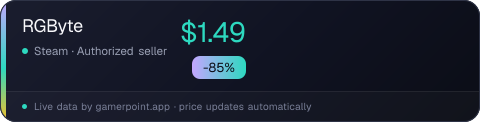
RGByte is currently 85% off at Steam for $1.49 (normally $9.99). Buyers are saving $8.50 on this deal.
Regional prices
Each region's own storefront price for the current best deal — we never convert currencies.
Media
About the Game
RGByte is batch image editing software with a focus on simplicity and productivity.
With it, you can easily perform basic edits and save changes for later use.
Available resources:
• Resizing - focus on standardization
• Basic color adjustments
• Modification of the alpha channel (transparency) - possibility to insert colors or textures
• Watermark addition - logo or image in specified position and size
• Sharpness and median filters
• Save edits via script
• Batch rename
• Use of multiple threads
• All selected features are applied to all images in the selected folder
Details:
Resize
Useful for resizing multiple images in a folder, leaving all with a default resolution. You can resize by width or height, or even select the longest or shortest side to base your changes on. The resize feature is useful for standardizing images for use on websites, distribution or even storage. Its focus is on decreasing the dimensions of the image.
Quality and format of files
It is possible to export the images in PNG and JPG format.
For JPG files, it is possible to modify the image quality and consequently the file size, very useful for sending images by email or even when you need to send samples to a client.
Basic color adjustments
Brightness, contrast, saturation and gamma.
Modification of the alpha channel (transparency)
Allows the editing of the alpha channel (transparency) of PNG images, being possible to insert a solid color, checkerboard texture (automatically generated) or insert an image (texture) to serve as a background.
This edit can be applied to a folder containing multiple images (PNG or JPG), images without transparency will not be affected by the edit.
Watermark addition (insert logo)
It is possible to insert a logo over the images in the selected folder. The logo can be inserted over the entire image or in a specific position. It is also possible for the logo to scale according to the size of the images in the folder so that it occupies a specified percentage, very useful for a folder with images of several different resolutions.
Sharpness and median filters
It has a sharpness and median filter (noise remover)
Batch rename
It is possible to define a new name for the images, adding a word and/or a counter (increasing number) at the end or beginning of the files.
Scripting
After making the necessary adjustments, it is possible to save the edits in a file (script) that can be used whenever needed. Just open the folder with the new images to be edited and open the script file.
Supported file format
Open JPG, PNG, BMP and GIF files.
Export to JPG and PNG.
Frequently Asked
›Where is RGByte cheapest right now?
RGByte is currently cheapest at Steam: $1.49 (85% off).
›What are the system requirements for RGByte?
You can find RGByte's minimum and recommended PC requirements listed above on this page.
›Does RGByte support English?
Yes — RGByte offers an English interface.
›How do I get notified when RGByte goes on sale?
Add RGByte to your favorites in the GamerPoint app and you'll get an instant notification when the price drops. You can also set up automatic tracking by genre, store and discount rate with the Deal Radar.
›Share this game
The price updates by itself, so whatever you post stays current.
<iframe src="https://gamerpoint.app/embed/rgbyte" width="320" height="96" style="border:0" loading="lazy" title="RGByte"></iframe>
<a href="https://gamerpoint.app/game/rgbyte">RGByte - GamerPoint</a>
[URL=https://gamerpoint.app/game/rgbyte][IMG]https://gamerpoint.app/badge/rgbyte.png[/IMG][/URL]